

Blog Summary
Google dropped two major updates in July 2026 that most business owners haven’t heard about yet. Google Search Console now lets you add social media profiles as trackable properties, and Google Analytics 4 has introduced native Google My Business data integration. These latest Google updates change how you track, analyze, and grow your online presence across every major platform simultaneously.
You’ve been running your business online for years. You check your website rankings in Search Console occasionally. You glance at GA4 once a month. But here’s the frustrating reality: until July 2026, you had absolutely no way to see how your Instagram, Facebook, or Google Business Profile actually performed alongside your website data in one unified Google dashboard.
You were essentially flying three separate planes at the same time with no central control tower.
The latest Google Analysis updates released this July have changed that completely. Google Search Console now supports social media platform properties, and Google Analytics 4 has introduced direct Google My Business (GMB) performance tracking. Together, these two updates give every business owner, digital marketer, and content creator a unified view of their entire online presence for the first time.
This isn’t a minor tweak. This is the biggest shift in Google’s measurement ecosystem since GA4 replaced Universal Analytics. And if you set these up correctly right now, you’ll have a genuine competitive advantage over every competitor who hasn’t figured this out yet.
What Are the New GSC and GA4 Updates in July 2026?
Here’s the short version:
Google Search Console now allows you to add social media accounts (Instagram, Facebook, LinkedIn, YouTube) as trackable properties alongside your website. Google Analytics 4 has introduced a native GMB integration that pulls your Business Profile performance data directly into your GA4 reports. Both features are rolling out globally through July 2026, with full India availability expected by early August. Setting up both takes under 30 minutes if you follow the correct steps.
What Exactly Changed: Understanding the July 2026 Google Updates
Before diving into setup steps, understanding what these updates actually do makes the configuration process far more logical and intentional.
Google Search Console: Social Media Properties Explained
Definition: A GSC property is any digital asset you add to Search Console for monitoring. Previously, properties were limited to websites and apps. The July 2026 update expands this to include social media platforms.
What this means practically: you can now see impressions, clicks, keyword associations, and engagement metrics from your Instagram, Facebook, LinkedIn, and YouTube profiles inside the same Search Console dashboard where you track your website.
This matters enormously because social media content increasingly appears in Google Search results. Instagram Reels appear in video carousels. LinkedIn articles appear in knowledge panels. Facebook posts surface in local search results. Until now, you had no way to track which of your social content was generating Google search visibility or which keywords your social profiles were ranking for.
A restaurant owner in Connaught Place running Facebook posts about their weekend specials had no idea those posts were appearing in “restaurants open Saturday Delhi” searches and driving 340 monthly impressions. With the new GSC update, that data becomes visible, trackable, and actionable.
Google Analytics 4: GMB Integration Explained
Definition: The GA4 GMB integration connects your Google Business Profile performance data directly into your Analytics 4 property, creating a unified view of how your local search presence affects website behavior and conversions.
Previously, GMB data lived exclusively inside Google Business Profile’s dashboard. You could see views, calls, and direction requests there, but you couldn’t see what happened after someone clicked through to your website from your GMB listing.
The July 2026 update closes this gap completely. Now you see the full journey: GMB impression → GMB click → website landing page → conversion.
Stat worth knowing: According to Google’s own data shared at Google Marketing Live 2026, businesses that connected GMB and GA4 reported 23% improvement in attribution accuracy for local search conversions within the first 60 days of integration.
Step-by-Step: How to Add Social Media Properties in Google Search Console
This process works for Instagram, Facebook, LinkedIn, and YouTube. The steps are consistent across all platforms.
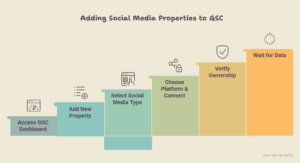
Step 1: Access Your GSC Dashboard
Open Google Search Console at search.google.com/search-console. Sign in with the Google account associated with your existing website property. You’ll land on your main dashboard showing your verified website properties.
Step 2: Add a New Property
Click the property selector dropdown in the top left corner of your GSC dashboard. Select “Add property” from the dropdown menu that appears. You’ll see the property type selection screen.
Step 3: Select Social Media Property Type
In the property type selection screen, you’ll now see a third option below “Domain” and “URL prefix” labeled “Social Media Account.” This is the new July 2026 addition. Click “Social Media Account” to proceed.
Step 4: Choose Your Platform and Connect
Select your platform from the dropdown (Instagram, Facebook, LinkedIn, or YouTube). You’ll be redirected to that platform’s OAuth authorization screen. Log into your social media account and authorize Google Search Console to access your profile data. Grant the requested permissions — GSC requests read-only access to public profile and post performance data.
Step 5: Verify Ownership
After authorization, GSC returns you to the verification screen. For social media properties, verification happens automatically through the OAuth connection. Unlike website properties that require HTML tags or DNS records, social media properties verify instantly. Click “Verify” to confirm.
Step 6: Wait for Data Population
Social media property data begins appearing in your GSC dashboard within 48-72 hours. You’ll see a new section in your performance reports labeled “Social Media Properties” alongside your existing website performance data.
Repeat this process for each social media platform you want to track. Most businesses benefit from adding all active platforms simultaneously.
Step-by-Step: How to Connect Google My Business to GA4
The GMB and GA4 integration requires access to both your Google Analytics 4 property and your Google Business Profile. Ensure you have admin access to both before starting.
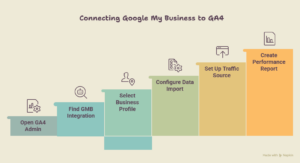
Step 1: Open GA4 Admin Settings
Go to analytics.google.com and open your GA4 property. Click the “Admin” gear icon in the bottom left navigation. You’ll land on the property settings panel.
Step 2: Find the New GMB Integration Option
In the Property column (middle column), scroll down to find “Google My Business Linking” — this is the new July 2026 addition to GA4’s admin panel. Click it to open the integration setup screen.
Step 3: Select Your Business Profile
GA4 will display all Google Business Profiles associated with your Google account. If you manage multiple locations, each appears as a separate option. Select the GMB listing you want to connect to this GA4 property. For businesses with multiple locations, you can connect multiple GMB listings to one GA4 property.
Step 4: Configure Data Import Settings
After selecting your GMB listing, you’ll see data import configuration options. Select which GMB data dimensions to import:
Recommended selections:
- Business Profile views (total and by surface)
- Search queries driving GMB impressions
- Direction requests by location
- Phone call clicks
- Website clicks from GMB
- Photo views and interactions
- Review count and average rating changes
Check all boxes for maximum data visibility, then click “Link.”
Step 5: Set Up GMB as a Traffic Source
In the same admin panel, navigate to “Data Streams” and open your website data stream. Under “Enhanced Measurement,” ensure “GMB referral traffic” is enabled. This tags website sessions originating from your Google Business Profile as GMB-sourced traffic in your acquisition reports.
Step 6: Create a GMB Performance Report
Once linked (data appears within 24-48 hours), navigate to “Explore” in GA4 and create a new exploration. Add “Session source/medium” as a dimension. Filter for “google / gmb” as the source. Add metrics including sessions, conversions, engagement rate, and revenue if you track e-commerce.
This becomes your GMB performance dashboard, showing exactly what your Business Profile contributes to your actual business outcomes.
What These Latest Google Updates Mean for Indian Businesses Specifically
The India rollout question comes up constantly in digital marketing communities: when will these features be fully available in India?
Based on Google’s official rollout communications, the GSC social media property feature began global rollout on July 7, 2026, with India included in the first wave of markets. Most Indian accounts show the social media property option in GSC already. If you don’t see it yet, expect access by July 31, 2026.
The GA4 GMB integration follows a slightly different timeline. Google confirmed full India availability by August 5, 2026. Accounts in major metros (Delhi, Mumbai, Bangalore, Chennai, Hyderabad) are receiving access first in the India rollout sequence.
What this means practically for Indian businesses: Local businesses in competitive markets like Delhi NCR, Mumbai, and Bangalore will gain significant analytical advantages by setting these up immediately versus waiting for competitors to catch on. Early adopters get several months of historical data before competitors even understand what changed.
A digital marketing team at a mid-sized e-commerce brand in Bangalore told us they set up the GMB GA4 integration in beta testing and discovered that 31% of their website’s purchase conversions actually originated from their Google Business Profile, attribution they had zero visibility into before. They reallocated GMB content investment accordingly and saw a 19% improvement in overall conversion efficiency within 45 days.
How These Updates Change Your Marketing Strategy Going Forward
Understanding the setup is step one. Understanding what to do with the data is what actually grows your business.
Social Media Keywords Are Now Trackable in GSC
Your GSC social media properties will show you which search queries your social content ranks for. This changes social media content strategy fundamentally. Instead of guessing what topics to post about, you’ll see exactly which keywords your social posts appear for in Google Search and optimize future content around high-impression, low-click queries to improve clickthrough rates.
GMB and Website Attribution Are Finally Connected
The classic attribution problem in local marketing was always: “Someone found us on Google Maps and then visited our website, but GA4 showed that session as direct traffic.” That attribution gap is now closed. Every GMB-driven session gets properly tagged, giving you accurate ROI calculations for your local search investment.
Cross-Platform Content Performance Becomes Visible
With both social media properties in GSC and GMB integrated in GA4, you can now see your complete digital footprint’s contribution to business outcomes. A LinkedIn article, an Instagram Reel, a GMB post, and your website blog can all be evaluated in the same analytical context. This level of visibility was previously only available through expensive third-party attribution platforms.
For businesses working with Dynamisers Solutions, this data integration has already become a standard part of the monthly reporting dashboard, giving clients a unified view of how every digital touchpoint contributes to actual revenue generation.
What to Do Immediately After Setting Up Both Features
Setting up properties and integrations is just the beginning. Here’s what to prioritize in the first 30 days.
Week 1: Complete all property additions and integrations. Verify data is flowing correctly. Check for any authorization errors in GSC or data gaps in GA4 GMB reports.
Week 2: Identify your top 10 performing GMB queries (now visible in GA4) and your top 5 social media search keywords (now visible in GSC). These become your content optimization priorities.
Week 3: Create content specifically targeting high-impression, low-conversion queries identified in your new data. This is your quick-win content calendar for the next 60 days.
Week 4: Build a unified monthly reporting template combining GSC website data, GSC social media data, and GA4 GMB data. Share this with stakeholders to demonstrate the full value of your digital marketing investment.
Working with an experienced digital marketing team like Dynamisers Solutions makes this implementation significantly faster, especially for businesses managing multiple locations or multiple social profiles requiring simultaneous setup and configuration across platforms.
Conclusion
The July 2026 Google updates represent a genuine turning point in how businesses measure and manage their online presence. Latest Google updates of this scale don’t happen every year, and the window to gain a competitive advantage from early adoption is narrow but real.
Setting up GSC social media properties and GA4 GMB integration gives you data connections that previously required expensive third-party tools or simply didn’t exist. You’ll finally see the complete picture of how your Instagram content, Google Business Profile, and website work together to generate customers and revenue.
The businesses winning in local and social search in 2027 are the ones building these measurement foundations right now. Don’t wait for your competitors to figure this out first.
Ready to Set Up These New Google Features for Your Business?
These updates are powerful, but getting the configuration right from the start saves weeks of troubleshooting later. The Dynamisers Solutions, a professional digital marketing team, can set up your GSC to social media properties and GA4 to GMB integration correctly, build your unified reporting dashboard, and help you interpret the data in ways that actually improve your marketing decisions. Call +91 9899269989 or visit our website dynamisers.com to get started.
FAQs
Q1. When will the new GSC social media property feature be available in India?
Ans. The feature began rolling out to Indian accounts from July 7, 2026. Most Indian accounts have access already. If you don’t see the “Social Media Account” option in your GSC property selector, full India availability is confirmed by July 31, 2026, according to Google’s official rollout communications.
Q2. Can I connect multiple social media accounts to one GSC property?
Ans. Yes. Each social media profile becomes its own separate property in GSC. You can add your Instagram, Facebook, LinkedIn, X, and YouTube as individual properties under the same GSC account. Data from each platform appears in separate reports but within the same unified dashboard for easy comparison and analysis.
Q3. What data does GA4 actually pull from my Google My Business profile?
Ans. GA4 pulls GMB views by surface (Search, Maps, direct), search queries driving impressions, phone call clicks, direction requests, website clicks, photo interactions, and review metrics. Most importantly, it now properly attributes website sessions and conversions that originated from GMB clicks, solving the attribution gap that frustrated local marketers for years.
Q4. Is it worth setting up these integrations for a small local business with just one location?
Ans. Absolutely. Small local businesses benefit most from GMB GA4 integration because local search often drives their highest-intent customers. Knowing which GMB content drives website visits and conversions helps you optimize your Business Profile posts, photos, and offers far more effectively than guessing. Setup takes under 30 minutes, and the data is immediately valuable.
Q5. What happens if I don’t set up these new GSC and GA4 features in 2026?
Ans. You continue operating with incomplete data. Your GMB-driven conversions get misattributed as direct traffic. Your social media’s Google search visibility remains unmeasured and unoptimized. Competitors who set these up early build several months of historical data and optimization experience before you start. The cost of waiting is measurable in missed attribution and slower content optimization cycles.
